New role, new tech stack, and this time I wanted to develop a deeper understanding of how C# is compiled and how the .NET runtime executes it.
The In-Between
Unlike languages like C or Rust that compile directly to native machine code, C# is compiled into a Common Intermediate Language(CIL) which is a platform-agnostic bytecode format. At runtime, the Common Language Runtime(CLR) translates CIL into native machine code, primarily through just-in-time (JIT) compilation.
The intermediate language is part of .NET’s core design principles, which was built as a multi-language, multi-platform runtime. C#, F#, and VB.NET all compile down to the same CIL bytecode and the CLR handles translating it to native code for whatever CPU architecture it’s running on, whether that’s x86/64 or ARM.
What’s Roslyn?
The original C# compiler was csc.exe, written in C++ and shipped with the .NET Framework starting in 2002. Source code went in, a compiled assembly came out, and nothing in between was accessible. There was no way for external tools to tap into what the compiler already knew about your code.
Nowadays Roslyn is the primary C# (and VB.NET) compiler, it takes in .cs files and produces assemblies - .dll or .exe files that contain CIL bytecode along with metadata about types, methods, and dependencies. Unlike csc.exe which had been used up until that point, Roslyn is a compiler that exposes every intermediate stage of compilation as a public API, the token stream, the syntax tree, the semantic model, the symbol table, all programmatically accessible. This is what powers IDE features like IntelliSense and refactoring, and it’s what security tools like CodeQL and Roslyn analyzers hook into to understand your code at a deep semantic level.
Roslyn was open sourced in 2014 and became the default compiler in Visual Studio 2015, fully replacing csc.exe and is written entirely in C# meaning the compiler compiles itself, which is called self-hosting. When you run dotnet build, MSBuild reads your .csproj, resolves dependencies, and delegates the actual compilation to Roslyn, which takes your source code through a series of phases in sort of a pipeline: lexing, parsing, semantic analysis, lowering, and IL emission.
Breaking Down the Source
The first thing Roslyn does with our source code is lexing, also called tokenization. The lexer goes over raw source text characters and breaks it into tokens. Under the hood, it doesn’t read directly from a string instead it uses SlidingTextWindow, an abstraction that sits over the source text which tracks a position cursor and lets the lexer peek ahead at upcoming characters without actually consuming them.
Let’s take a simple line a variable declaration:
1 | string name = "John"; |
At each position, the lexer looks at the current character to figure out what kind of token it’s dealing with. For the vast majority of token types (identifiers, keywords, single-character operators, number literals) Roslyn doesn’t even use the full lexer. It routes them through the QuickScanner, an optimized state machine with minimal branching and allocation. Only the weird stuff like interpolated strings, preprocessor directives, and unicode escapes falls through to the full lexing logic.
Quick note, whitespace, comments, newlines, preprocessor directives, anything in the source that has no effect on what the program actually does is called trivia. Most compilers toss it during lexing but Roslyn keeps all of it, attaching each piece to adjacent tokens as leading or trailing trivia. This is what lets IDE refactoring tools rename a variable or insert a code fix without destroying your formatting.
Walking through string name = "John"; the lexer sees s, a letter, so it enters the identifier/keyword scanning path. It advances: t, r, i, n, g, all letters. Next character is a space, not a letter, digit, or underscore, so the token boundary is hit. Now it needs to figure out if what it just consumed is a keyword or an identifier. It runs string through a hash based lookup against the reserved keyword table. string matches, so it emits a StringKeyword token.
Next up, n follows the same scanning path. Consumes n, a, m, e, hits a space. Keyword lookup comes back empty for name, so it’s an IdentifierToken. The lexer has absolutely no idea that this is a variable name, could be a class, a method, a namespace.
Then =, operators use lookahead, the lexer peeks at the next character to check if it’s part of something else.
Next char is =? That’s an equality operator ==.
Next char is >? That’s a lambda function =>.
Here it’s a space, so just an EqualsToken. Same peek-ahead logic handles every compound operator in C#: !=, &&, ||, ??, ??=, >>=.
Up next is " which slightly changes the how its being looked at. The lexer switches into string literal mode, where instead of stopping at spaces or operators, it eats everything until a closing " and along the way it also handles escape sequences (\n, \t, \\, \"). Different string types get different treatment. Verbatim strings (@"...") ignore escapes and only stop at a doubled "", raw strings ("""...""") count opening quotes and match the same number to close, and interpolated strings ($"...{expr}...") get properly recursive since the expression inside the braces can itself contain strings. Here it’s simple: J, o, h, n, closing " so we emit a StringLiteralToken.
Finally ;, single character, no ambiguity, SemicolonToken. The cursor reaches the end of the source and the lexer emits an EndOfFileToken to signal the stream is done.
The core concept here is that the lexer always consumes as many characters as possible that still form a valid token before stopping. Hit an unrecognizable character? BadToken, advance one position, move on. The lexer always makes progress, always produces output. Whether any of it makes sense as a program, that’s the parser’s headache later on.
Translating the Stream
Now that we’ve grasped a basic understanding how Roslyn treats the text inside our source code, those tokens need to be parsed into something usable.
The parser takes the flat token stream from the lexer and figures out how the tokens relate to each other hierarchically. It reads tokens left to right, one at a time, and builds a syntax tree where each node represents a grammatical construct in C#.
The parser is a recursive descent parser, meaning it has a method for each grammar rule in the C# language. There’s a method for parsing a class declaration, a method for parsing an if statement, a method for parsing an expression, a method for parsing an argument list, and so on. These methods call each other recursively based on what they encounter.
When the parser sees your tokens from string name = "John";, the call chain looks roughly like this:
1 | ParseCompilationUnit() |
Each method knows what tokens it expects. ParseEqualsValueClause() expects an = token followed by an expression. ParseLocalDeclarationStatement() expects a type, then a variable name followed by a semicolon.
The resulting syntax tree for string name = "John"; looks like: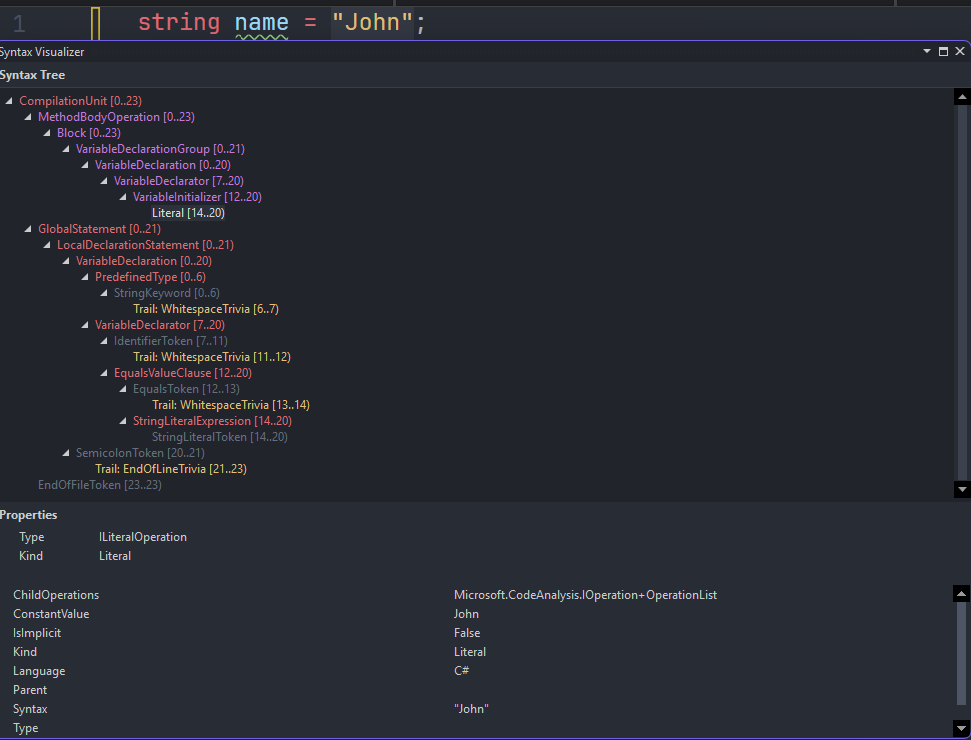
Every node is a strongly-typed C# object. LocalDeclarationStatement is LocalDeclarationStatementSyntax. VariableDeclaration is VariableDeclarationSyntax. These are all real types in the Microsoft.CodeAnalysis.CSharp.Syntax namespace that you can inspect, query, and traverse through Roslyn’s public API.
Still No Meaning
The parser knows structure but not meaning, it knows there’s a variable declaration with type string, name name, and initializer "John". But it doesn’t know:
- Whether
stringis actually a valid type - Whether
nameis already declared in this scope - Whether
"John"is assignable to `string - Whether this statement is inside a method body or floating at the top level of a namespace
You could feed the parser FakeType abc = foo.bar(); and it would produce a valid syntax tree. Whether FakeType exists, whether foo is in scope, whether bar() returns something compatible, all of that is the binder’s job in the next phase.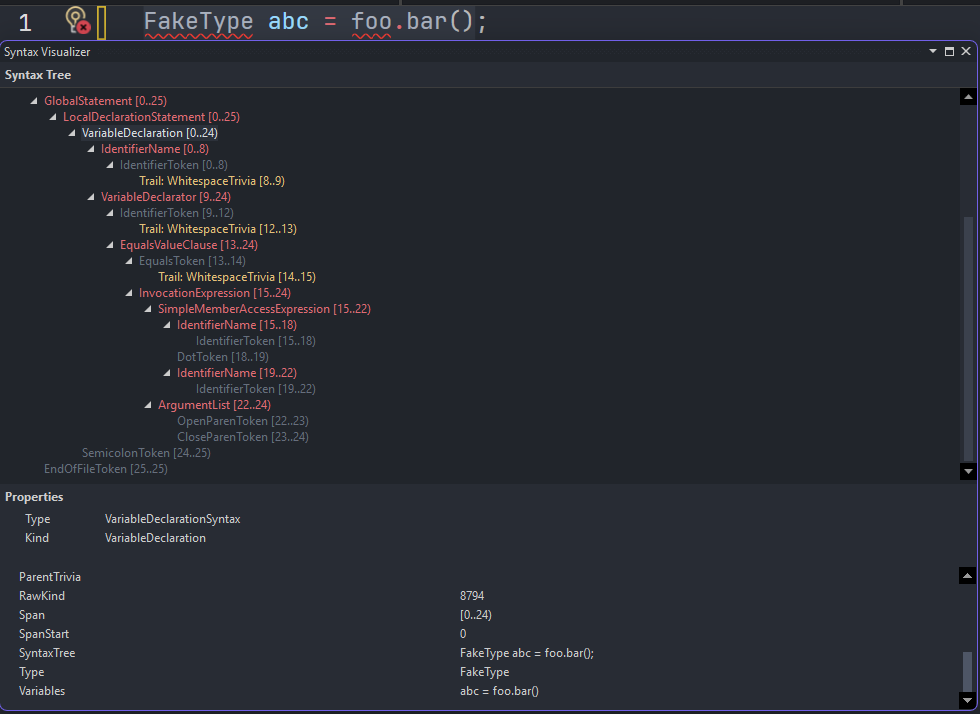
The parser only rejects things that are structurally don’t make sense. string = "John" name; would cause a parse error because the tokens don’t match any valid C# grammar rule.
Immutability and structural sharing
Roslyn syntax trees are completely immutable. Once created, no node ever changes and if you want to modify a tree, you create a new one, but Roslyn doesn’t copy over the whole thing.
It uses structural sharing, reusing every node that didn’t change and only allocating new nodes for the changed parts and their ancestors up to the root.
The Red-Green Tree
Before we move past the syntax tree, there’s one implementation detail worth understanding because it explains how Roslyn can be both immutable and practical at the same time.
The naming sounds like two separate trees for different purposes, but it’s really one logical tree with two layers, the green tree is the data and the red tree is the position. Every green node knows what it is (a keyword, an identifier, an operator) and how wide it is in characters, but has no idea where in the file it lives. That’s what makes sharing possible. If string appears 50 times, the width is always 6, the kind is always StringKeyword, so it’s literally the same object reused everywhere.
The red layer is position. When you ask “where is this node in the file?” the red tree is what points to it. Red nodes are created on demand as you navigate, and thrown away when the tree changes, because a rename shifts every position downstream.
The green tree also squeezes out further efficiency in how individual nodes store their children. Rather than every node holding a generic array, Roslyn picks a storage strategy based on child count. A node with one child just returns itself. Two or three children get stored as inline fields, no array allocation at all. Four to nine use a small array. Ten or more get an array with precomputed offsets for fast child lookup: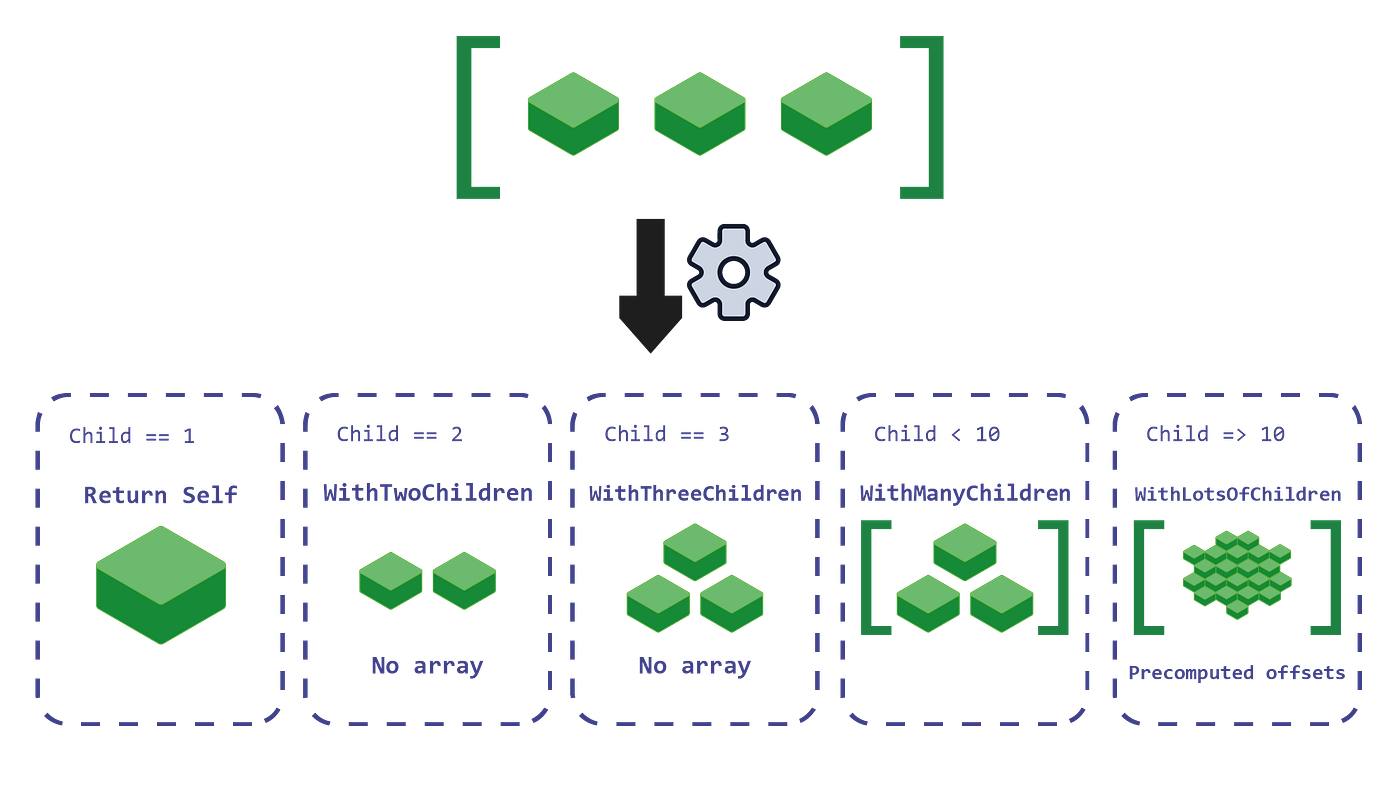
The practical payoff is that every keystroke technically produces a new syntax tree, but almost none of it is new. Roslyn only allocates fresh green nodes for what changed and their ancestors up to the root. Everything else is the same objects reused from before, the red layer gets thrown away and rebuilt cheaply since it’s just wrappers doing position arithmetic. This is partly why IDE tooling remains responsive at scale.
Binding
The syntax tree knows structure but not meaning, that’s why the parser produced a valid tree for FakeType abc = foo.bar(); without knowing whether FakeType exists or whether foo is in scope.
Binding takes the syntax tree and resolves every name, type reference, and expression against the symbol table, which is Roslyn’s in-memory model of every type, method, field, property, and local variable the compiler knows about, including everything pulled in from referenced assemblies. The output is a bound tree, a new representation where every node carries full type and symbol information alongside the original syntax.
For string name = "John"; the binder does a few things. It looks up string and resolves it to System.String in mscorlib. It checks whether name is already declared in the current scope. It looks at "John" and confirms it has type System.String. Then it checks assignability if System.String assignable to System.String.
Now try something slightly different:
1 | object name = "John"; |
The binder sees a string literal being assigned to System.Object. It checks is System.String assignable to System.Object? Yes, because String inherits from Object and it emits an implicit reference conversion and moves on.
That silent behavior matters more when the types are less obviously compatible. C# has an implicit conversion table: numeric widening, user-defined implicit operators, nullable value type lifting.
If you validate a value and then assign it to a type that triggers an implicit conversion, you validated the pre-conversion value and you’re operating on the post-conversion one. The validation and the actual value the code uses are no longer looking at the same thing. With user-defined implicit operator conversions this gets worse, since the conversion logic is somewhere else entirely and nothing at the call site says it’s happening.
The binder also handles overload resolution, when you write Console.WriteLine(name), there are 18 overloads of WriteLine. The binder eliminates candidates that don’t match the argument types, applies various rules, and picks one silently. This is normally fine, but it gets interesting when a library has overloads with meaningfully different behavior and the compiler picks between them based on a type that also isn’t obvious at the call site.
Where Security Tools Live
This is the phase where tools like CodeQL and other Roslyn analyzers hook into, and it’s worth mentioning what that actually means.
Roslyn analyzers register as DiagnosticAnalyzer implementations and get callbacks during compilation. When binding produces a SemanticModel, it’s exposed through the analyzer API. The analyzer can call semanticModel.GetSymbolInfo(node) on any syntax node and get back the resolved symbol, the actual IMethodSymbol, ITypeSymbol, ILocalSymbol. You’re not pattern matching on strings, you’re practically querying the resolved symbol table the compiler itself built.
That’s the difference between a regex based scanner and a semantic one, a regex scanner looking for SQL injection might look for string concatenation near the word “query”. A Roslyn analyzer can go deeper and ask: does this expression flow from a parameter with no sanitization, through any call path, into a method sink whose symbol is SqlCommand.ExecuteReader?
Taint tracking works at this level because binding had already performed the hard work, every variable reference is resolved to a declaration and every method call is resolved to a concrete symbol. The data flow engine follows a value from source to sink because the symbol graph gives it a complete flow chart from one point to another.
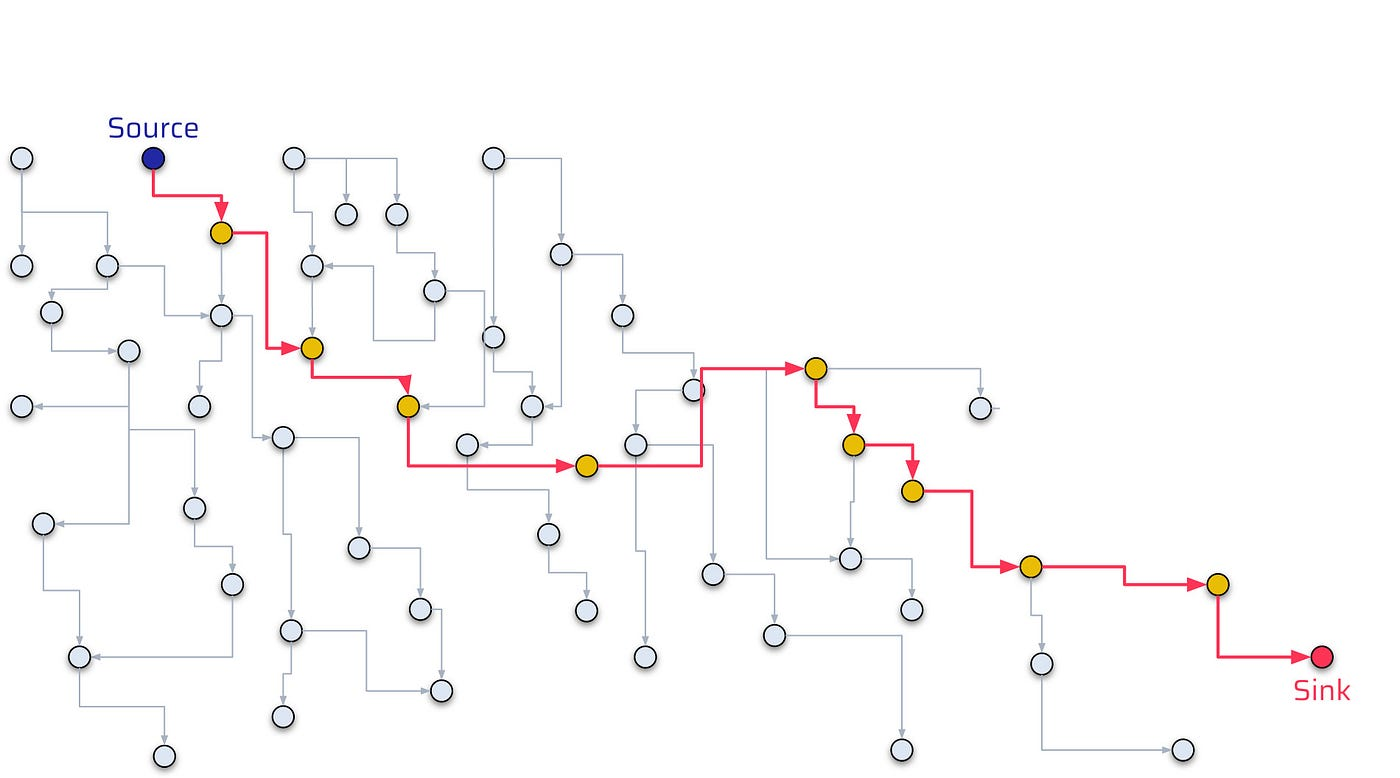
For string name = "John";, a taint analyzer marks name as untainted since the source is a literal. Change it to:
1 | string name = Request.QueryString["name"]; |
Now the binding phase resolves Request.QueryString to System.Web.HttpRequest.QueryString, a known taint source.
1 | new SqlCommand("SELECT * FROM users WHERE name = '" + name + "'"); |
The analyzer sees taint reach a SQL sink and fires, the symbol graph made the path unambiguous.
This is also why renaming a dangerous method doesn’t fool a semantic analyzer. It knows the symbol, not the string name. ExecuteReader renamed to RunQuery in a wrapper is still resolved to the same underlying method symbol if the wrapper is transparent, or flagged as a new sink if you’ve annotated it.
Lowering
After binding, Roslyn runs a phase called lowering. The bound tree still reflects the C# you wrote, and a lot of C# syntax is high-level shorthand for more complex patterns that IL can’t directly express. Lowering rewrites the tree into simpler, more explicit constructs before anything gets emitted.
foreach over an IEnumerable<T> becomes a while loop with an explicit enumerator, GetEnumerator() call, MoveNext() check, and Current access. using blocks become try/finally with an explicit Dispose() call. ??= becomes a null check plus assignment. String interpolation becomes a string.Format call or a StringBuilder sequence depending on complexity. Pattern matching gets flattened into nested conditionals and type checks.
Async State Machines
When you write an async method, lowering transforms it into a state machine. Roslyn generates a struct that implements IAsyncStateMachine, and every local variable your method needs across an await point becomes a field on that struct.
1 | app.MapGet("/login", async (HttpContext ctx) => |
Because password is used after the await it’s no longer a stack local that disappears when the method suspends. It’s a heap-allocated field on the state machine struct that lives until the entire async operation completes and the object is garbage collected.
We’ll dig through this with dotnet-dump which ships with the .NET SDK. Run the app, hit the endpoint, and capture the request while it’s suspended at the await
1 | dotnet-dump ps |
Inside the analyze session, find the state machine by walking down from the ASP.NET request pipeline:
1 | > dumpheap -type ExecuteTaskResult |
From an attacker’s perspective, .NET processes are a high-value target for memory scraping precisely because of this. Any process handling authentication, Bearer tokens, API keys, or database credentials in async methods is leaving those values on the heap for the taking.
On a compromised host with local access, collecting a dump from a running .NET web process takes one command and about ten seconds. No elevated privileges needed if you own the process. The analysis we just walked through, finding the state machine, reading the field, printing the string, is repeatable on any .NET async application with little to no prior knowledge of the codebase.
For defenders, mitigation options are genuinely limited. You can’t control GC timin, what you can control is scope. Don’t hold sensitive values across await boundaries if you can avoid it and if you really must, clear them explicitly before awaiting since the GC may not zero the memory immediately. Treat any mechanism that can produce a heap dump, crash reporters, diagnostic tools, monitoring agents, as a potential credential exfiltration path .
Closure Classes
When a lambda references a variable from the surrounding scope, the compiler runs into a problem which is that the lambda can be called anywhere potentially long after the method that declared the variable has returned. The stack frame is gone and the variable needs to survive.
The solution is assigning it to the heap just like async. The compiler generates a class, moves the captured variable into a field on that class, and both the outer code and the lambda reference the same instance, a closure class.
1 | string password = GetPassword(); |
After lowering, password is no longer a stack local, it is a field on a compiler generated class named something like <>c__DisplayClass3_0. The delegate validate holds a reference to that class instance, and as long as anything holds a reference to validate the class stays alive, and so does password.
The lifetime is harder to reason about than the async case. With an async method you at least know the state machine lives for the duration of the request but in a closure, the lifetime depends entirely on whoever holds the delegate. Pass it to another component, register it as an event handler, cache it, hand it to a background task, and the captured password travels with it. Nulling your local reference does nothing. From a heap dump perspective this is identical to what we demonstrated with async. dumpheap finds the closure class, dumpobj prints its fields, and the captured value is sitting there in plaintext.
IL Emission
Once lowering is done Roslyn takes the fully transformed bound tree and emits CIL bytecode into an assembly, outputting a .dll or an .exe. Inside there are two things that matter, the CIL section containing the bytecode for every method, and the metadata section containing a complete description of every type, method signature, field, property, and attribute in the assembly.
CIL is a stack-based instruction set, meaning there are no registers like in x86. Instead every operation pushes values onto an evaluation stack and pops them off. To add two numbers you push both onto the stack and call add, the runtime pops them, adds them, and pushes the result back.
We’ll demonstrate this on a simple license validation program:
1 | public static class LicenseValidator |
16 character key, no separator. The first 8 characters seed a rolling XOR with bit rotation. The last 8 are validated against that seed as a checksum. The two halves are coupled, you can’t brute force them independently.
Loading the compiled DLL into dnSpy allows us to view the IL Roslyn actually emitted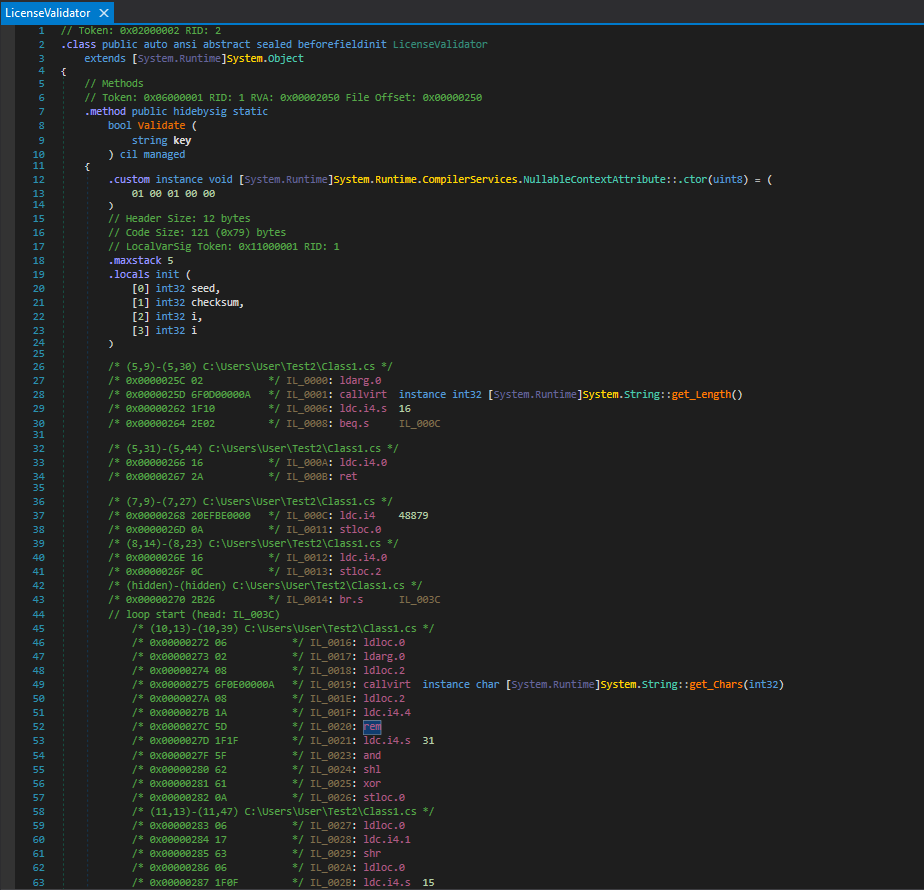
Walking through the first few instructions showcases how the stack machine works
1 | IL_0000: ldarg.0 // push 'key' onto the stack |
That’s the if (key.Length != 16) return false check. ldarg.0 loads the first argument, callvirt calls the Length property, ldc.i4.s 16 pushes the constant 16, beq.s pops both and branches if they’re equal. If they’re not equal execution falls through to ldc.i4.0 and ret, returning false.
Further down is the seed initialization
1 | IL_000C: ldc.i4 48879 // push 0xBEEF (48879 in decimal) |
ldc.i4 loads a constant integer stloc.0 stores it into the first local variable slot. The locals are declared at the top of the method.
1 | .locals init ( |
Every local variable, its type and its slot index, declared explicitly. And the XOR with bit rotation from inside the loop.
1 | IL_0024: shl // shift left |
Each C# operator maps to exactly one or two IL opcodes. The stack makes the order of operations explicit in a way that source code abstracts away.
The Metadata Problem
The IL is only half the story because the metadata section is what makes .NET assemblies fundamentally different from native binaries from a security perspective.
Every type definition, method signature, field name, parameter name, and string constant is stored in a set of metadata tables that the CLR reads at runtime for type loading, reflection, and JIT compilation. This metadata has to be there since the runtime depends on it, stripping it means practically breaking the assembly.
The consequence is that a release build of a .NET assembly contains everything a researcher needs. Not just the logic, but the names. LicenseValidator, Validate, seed, checksum, are all preserved. dnSpy reads the metadata and the CIL together to reconstruct source that’s nearly identical to what was written.
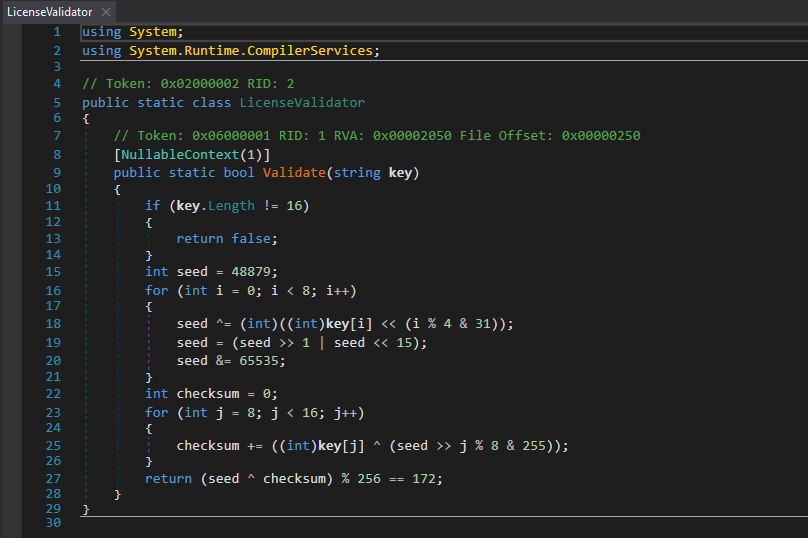
This does an exceptionally better job at reconstructing source code than native binary decompilation tools like Ghidra or IDA, we can clearly see 0xBEEF displayed as 48879, 0xAC as 172, 0xFFFF as 65535. The rotation logic, the checksum loop, the final condition, and everything.
Similarly, dnSpy lets you modify the CIL of any method and save the patched assembly back to disk.
Obfuscators like Dotfuscator and ConfuserEx exist to fight both of these threats. They rename symbols to meaningless characters, encode string constants, flatten control flow, and inject fake branches. They raise the bar but don’t eliminate the problem, the logic still has to execute correctly at runtime, which means it always has to be present in a form the CPU can run, and that’s always close enough to readable for a determined analyst. Patching doesn’t care about obfuscation because you don’t need to understand obfuscated code to replace a method body with return true.
The key takeaway from this is secrets don’t belong in .NET assemblies, and security logic that can be patched out in five minutes isn’t security. If a threat model includes an attacker who has access to your binary, managed code gives them a significant advantage that native code doesn’t.
The Runtime
The assembly on disk is CIL, not native code as a result nothing in it can execute directly on the CPU. When the process starts, the CLR takes over.
For an .exe the PE file contains a small native stub, a few bytes of real machine code whose only job is to load the CLR into the process. The CLR reads the assembly’s metadata, sets up the type system, locates the entry point method, and hands off execution. From that point on, methods run as CIL until something actually needs to execute them.
The first time any method is called, the CLR hands it to RyuJIT, the just-in-time compiler. RyuJIT reads the CIL for that method, compiles it to native machine code for the current architecture, x86-64, ARM64, whatever the host is running, caches it, and executes it. Every subsequent call to the same method skips compilation entirely and runs the cached native code. This is why .NET has a cold start cost but steady-state performance close to native.
RyuJIT isn’t just translating CIL to assembly one-to-one, it runs real optimizations such as inlining small methods, eliminating dead code, unrolling loops, allocating registers. The native code it produces is meaningfully different from a naive translation of the IL we just saw in dnSpy.
What the CLR Enforces
The CLR enforces a set of safety guarantees at runtime that fundamentally change the vulnerability landscape compared to native code.
Every array access is bounds checked, before array[i] executes the runtime verifies that i is within the valid range. An out of bounds access throws an IndexOutOfRangeException, it doesn’t corrupt adjacent memory. Classic buffer overflows simply don’t exist in managed code because there’s no way to write past the end of an array and hit a return address.
The type system is enforced at runtime as well. You can’t cast an object to an incompatible type and start reading its memory as if it were something else. An invalid cast throws InvalidCastException. References always point to valid objects of the declared type.
RyuJIT specifically tries to eliminate bounds checks it can prove are unnecessary through static analysis. If it can determine that a loop index is always within range, the check gets removed and you pay no performance penalty. But the default is safe, the check is there unless the JIT can prove otherwise.
This is why memory corruption vulnerabilities are rare in managed .NET code. The conditions that make C and C++ dangerous like pointer arithmetic, manual memory management, unchecked array access, simply don’t exist in the managed execution model.
The unsafe keyword removes all of that though, code marked unsafe can use raw pointers, do pointer arithmetic, and index memory without bounds checks. It opts out of the CLR’s safety guarantees entirely and behaves like classic C. Buffer overflows, use-after-free, arbitrary memory reads, all possible inside an unsafe block. Most .NET code never uses it, but it exists, and third party libraries sometimes do.
NativeAOT
NativeAOT is a compilation mode that changes the entire picture. Instead of shipping CIL that gets JIT compiled at runtime, NativeAOT compiles everything ahead of time into a self contained native binary.
From a deployment perspective it means smaller binaries, faster startup, no runtime dependency. But from a security perspective the attack surface flips entirely.
Everything we demonstrated in the IL emission section stops working against a NativeAOT binary. Load it into dnSpy and you get raw disassembly, not decompiled C#. The metadata that made LicenseValidator, Validate, seed, and checksum visible is gone. Symbol names are stripped in release builds. You’re back to the native reversing problem, which requires disassembly, patience, and reconstruction of intent from raw assembly instructions.
NativeAOT also changes what features are available, arbitrary reflection, dynamic code generation via Emit, and certain serialization patterns that depend on runtime metadata either don’t work or require explicit annotations to preserve the information they need. Applications have to be written with deliberate AOT compatibility in mind.
For applications where binary confidentiality or IP protection matters, NativeAOT shifts the threat model closer to what native compiled language ecosystems deal with. For applications where the CLR’s safety guarantees, rich reflection, and deployment flexibility matter more, the standard JIT path makes more sense.
Where Does This Leave Us?
Most developers interact with the compiler as a black box, code goes in and a binary comes out, everything in between is someone or something else’s problem.
The pipeline isn’t just a technical curiosity, it’s the reason your tooling works, the reason certain bugs exist, and the reason some attack classes are possible against .NET that aren’t possible against native code, and vice versa. Roslyn’s public API exists because the compiler exposes its internals, and that’s the same reason IDE features, refactoring tools, and security analyzers can all work off the same semantic model.
Heap exposure in async methods isn’t a bug, it’s a necessary consequence of how the runtime suspends and resumes execution. The decompilability of .NET assemblies isn’t an oversight, it’s the cost of a metadata-driven runtime that enables reflection, dynamic loading, and cross-language interop.
Understanding the pipeline changes how you read a vulnerability, how you evaluate a security tool, and how you reason about the guarantees your code actually has versus the ones you assumed it had. Every phase makes decisions that have consequences, and most of those consequences were intentional tradeoffs made by people with different priorities than security. Knowing what those tradeoffs are is what separates understanding a platform from just using it.